
On this page
- The four jobs behind "Playwright alternatives"
- Playwright vs Cypress vs Selenium vs Puppeteer
- The gap all four share
- What are Playwright test agents?
- Where Reticle fits, and where it does not
- Which Playwright alternative fits your team
- Migration effort: add a layer or replace the runner
- Fun fact
- Conclusion
- FAQ
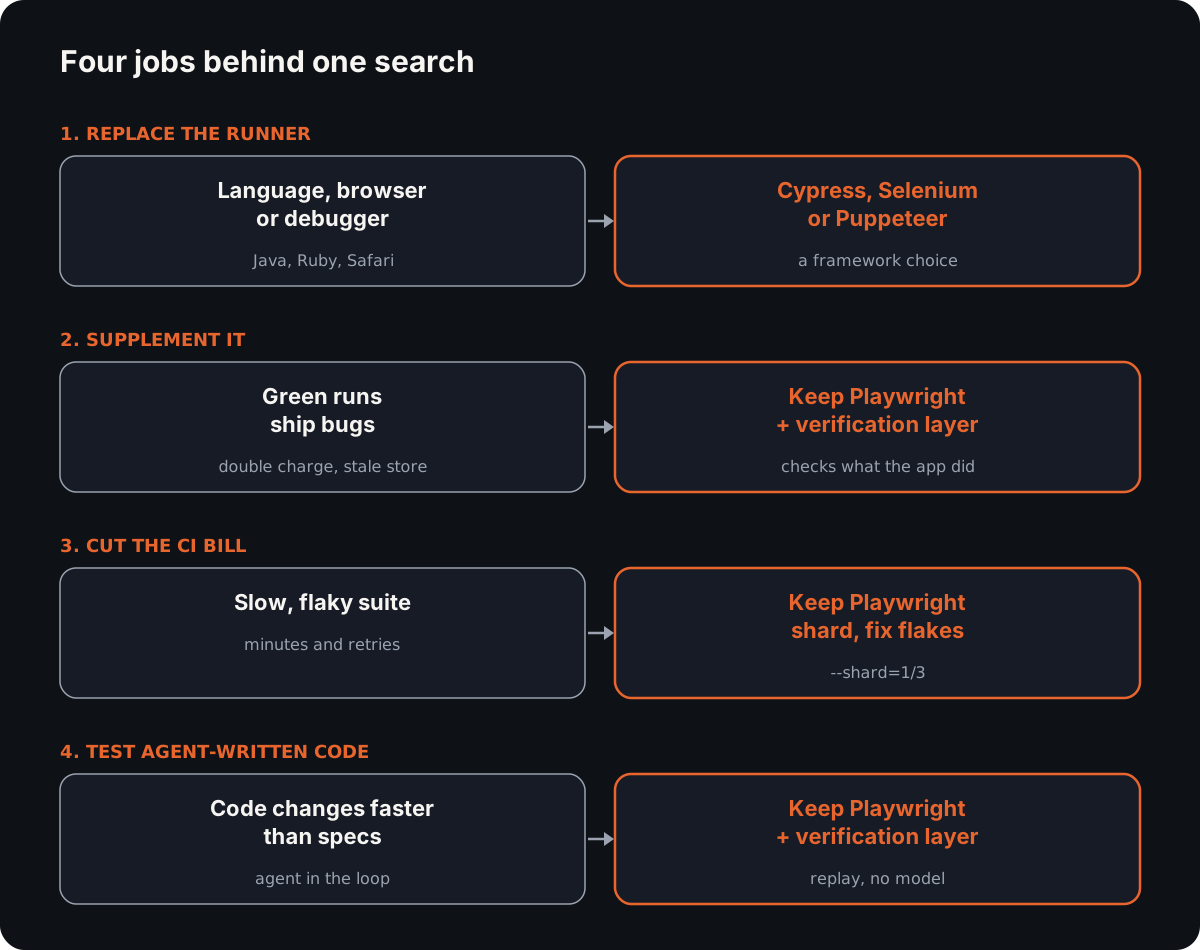
Most pages about Playwright alternatives assume you want to replace Playwright. Most people searching for one want something narrower: a different runner, something to run beside it, a cheaper CI bill, or a way to check code an agent wrote. Those are four different jobs, and for one of them the right answer is to keep Playwright.
If your job is the fourth one, you can Start a 14-day trial (sign in, then add a card under Billing; the free plan needs none) or read the open-source SDK first.
Every runner below is the part of your test harness that drives the browser. The question is what each one checks once it gets there.
The four jobs behind "Playwright alternatives"
1. Replace the runner. Your team writes Java or Ruby, needs a browser Playwright does not cover, or just prefers another tool's debugger. This is a framework choice, and the comparison table is where to start. For the unit-level frameworks that sit beside these runners, see test automation frameworks.
2. Supplement it. The suite works, but green runs keep shipping bugs: a double charge, a store that never updated. Swapping runners will not fix that, because every runner checks the same thing. See the gap all four share.
3. Cut the CI bill. A slow suite is usually a sharding and flake problem, and Playwright already has sharding. Before migrating, read the migration costs.
4. Test code an agent wrote. The agent changes code faster than anyone writes specs. Playwright's own agents generate specs; a verification layer checks the change. See Playwright test agents and where Reticle fits.
Playwright vs Cypress vs Selenium vs Puppeteer
Every cell below comes from the tool's own docs, checked on 2026-10-26.
| Tool | Language support | Browser coverage | Parallelism model | What it asserts on | Best fit |
|---|---|---|---|---|---|
| Playwright | JavaScript/TypeScript, Python, Java, .NET (docs) | Chromium, WebKit, Firefox, plus branded Chrome and Edge (docs) | Worker processes, test files in parallel by default, --shard across machines (docs) | Locators and page state through web-first assertions; screenshots with toHaveScreenshot() (docs) | Cross-browser end-to-end suites in most stacks |
| Cypress | JavaScript/TypeScript (GitHub) | Chrome-family and Firefox; WebKit experimental; Electron deprecated (docs) | By spec file, coordinated by Cypress Cloud with --record --parallel (docs) | DOM through bundled Chai and jQuery assertions; spies and stubs through Sinon (docs) | Frontend teams who debug in the browser |
| Selenium | Java, Python, C#, Ruby, JavaScript, Kotlin (docs) | Chrome, Edge, Firefox, Safari, Internet Explorer | Selenium Grid distributes sessions across machines | Nothing built in: your test framework (JUnit, Node's assert) asserts on elements | Polyglot teams and existing Grid estates |
| Puppeteer | JavaScript (pptr.dev) | Chrome and Firefox, over CDP or WebDriver BiDi | None built in: it is a library, not a test runner | Nothing built in: pair it with a test runner | Browser scripting, scraping, PDFs |
Playwright vs Cypress comes down to browsers and debugging. Playwright covers WebKit and runs in four languages. Cypress keeps a snapshot of every command, so you can "time travel to previous states while you debug" (docs), and parallel runs go through its Cloud.
Playwright vs Selenium comes down to languages and estate. Selenium adds Ruby and Kotlin and drives Safari itself. If you already run a Grid with thousands of Java tests, a rewrite buys little.
The gap all four share
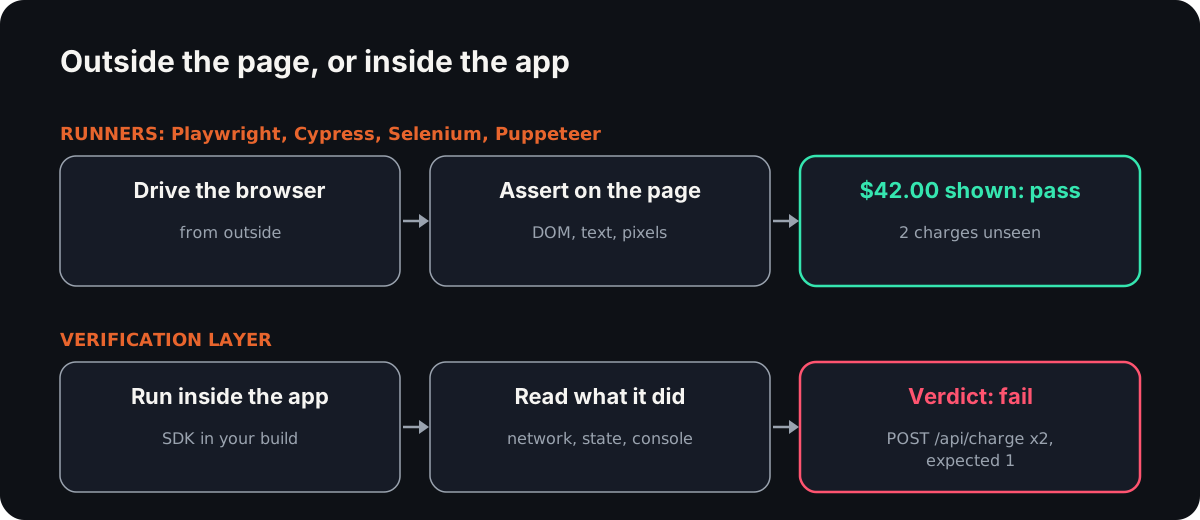
Read the "asserts on" column again. Every runner checks what reached the page: an element, its text, a screenshot. Swapping between Playwright alternatives does not change that.
Playwright and Cypress can also intercept network calls if you write the code to do so. By default, though, none of them reports what the program did behind the page. That gap has three separate parts.
Judgement: who decides what correct is
A runner checks what someone wrote down. If the spec says the total shows "$42.00", the runner confirms "$42.00" appears. It cannot know that the card was charged twice to get there, because nobody asserted on charges. Your flaky tests live in the same blind spot: a check that reads the wrong signal flips without the code changing.
No tool removes judgement, Reticle included. A person still decides what the right total is. What changes is how much of the outcome is written down.
State: what the app holds after the click
A store that never updated, an order stuck in pending, a cache with stale data: none of these show up in the DOM until a later page reads them. To check them in Playwright, you expose the state yourself through a test hook or an API call. Most suites never do, so most suites never check.
Cost per re-run: what a second run costs
A compiled Playwright suite costs CI minutes and zero model tokens per run. That is the cheapest re-run there is, and nothing here beats it.
The cost appears when a model drives the browser instead: re-driving one flow with an LLM took about 30,000 tokens in our benchmark, every run, with a sampled result each time. This is the trade at the centre of AI test automation: a model is cheap to write tests with and expensive to re-run them with.
What are Playwright test agents?
Playwright test agents are three agents that ship with Playwright: a planner, a generator and a healer (docs). They arrived in Playwright 1.56 (release notes), and npx playwright init-agents --loop=claude (or vscode, codex, opencode) installs them.
- Planner explores the app and writes a Markdown test plan into
specs/. - Generator turns the plan into Playwright tests under
tests/, checking selectors and assertions against the live app. - Healer runs the suite and repairs failing tests, re-running until they pass or guardrails stop it.
What they produce is ordinary Playwright code, which then re-runs at zero tokens. That is a real advantage.
What they do not decide is whether the behaviour is right. The generator asserts on what the planner thought to check. The healer's own documented outcome includes "a skipped test if the healer believes that functionality is broken": a model's belief turns a failure into a skip.
If you use the agents, review what the healer skipped. To see how they compare with other AI testing tools on what decides pass or fail, read our twelve-tool comparison. Our Playwright test agents alternative page goes deeper.
Where Reticle fits, and where it does not
Reticle runs inside your app as an SDK and checks each change from network calls, application state and the console. Saved flows replay with no model in the loop.
Where it fits:
- Checks on what the program did. A request count, a store value, a console error. On our 88-bug registry it caught 86, against 60 for Playwright MCP driving the same flows (measured 2026-07-24, confidence table).
- Cheap re-runs when an agent is in the loop. A four-flow suite re-verifies in about 480 tokens, about 250x cheaper than an LLM re-drive, with 0% flake over eight identical replays (scorecard).
- Agent-written code. Your coding agent calls it over MCP while it works.
Where it does not:
- Pixel regressions. It reads structured events, not pixels. Playwright's
toHaveScreenshot()or a visual testing tool is the right choice. - Cross-browser rendering. A session runs in one browser. It does not compare Chromium, Firefox and WebKit; Playwright and Selenium do.
- Sites you do not own. It can drive a third-party site and read its network, DOM and console, but app state and
file:lineneed the SDK in your own build. For someone else's site, Playwright is the better tool. - Source lines on Vue and Angular. It works on React, Next.js, Vue, Svelte and Angular. The
file:linepointer covers React and Svelte components; on Vue and Angular a verdict names the failing request or state, not the line. - Native mobile apps. It covers web and desktop (Electron, Tauri). WebdriverIO drives native apps through Appium.
- Zero-token re-runs. A compiled Playwright suite costs no tokens at all; Reticle's replay costs a few hundred.
Three tools beat us on a stated axis: Playwright on browser coverage and zero-token re-runs, Selenium on language support, and Cypress on interactive debugging.
Which Playwright alternative fits your team
| Team shape | Recommendation |
|---|---|
| A healthy Playwright suite, CI is slow | Keep Playwright. Shard with --shard and fix the flaky tests before anything else. |
| Pixel-perfect UI across browsers matters | Keep Playwright, and use toHaveScreenshot() per browser. |
| A Java or Ruby shop with a Selenium Grid | Stay on Selenium. Its language support beats Playwright's and Reticle's. |
| A frontend team that debugs in the browser | Cypress. Its time-travel command log beats Reticle's for stepping through a failure. |
| Chrome-only scripting, scraping or PDFs | Puppeteer. It is a lighter library, with no test runner to configure. |
| Agents write most of the code | Keep Playwright as the release gate and add a verification layer for each change. |
Migration effort: add a layer or replace the runner
Replacing the runner means rewriting every spec. Locators, waits, fixtures and the CI config all change, and the new suite has to earn the trust the old one had. Budget for running both suites side by side until the new one catches what the old one caught. For a suite of hundreds of specs, that is a project measured in weeks, and it ends with the same gap: the new runner also checks what reached the page.
Adding a verification layer leaves the suite alone. For Reticle, RETICLE_INSTALL_SOURCE=blog npx @reticlehq/server init installs two dev dependencies and wires the build plugin; your agent drives a flow once, and the flow replays from then on. The cost is setup on each app, the tokens per replay, and the discipline to write down what each flow should do. Nothing you already run has to change.
Fun fact
Selenium's name started as a joke. Jason Huggins built it at ThoughtWorks in 2004, and its name mocked a competitor called Mercury, because "mercury poisoning can be cured by taking supplements of the element selenium" (Wikipedia).
Half this table is one family, too. Microsoft launched Playwright in January 2020 with engineers "who had previously worked on Puppeteer at Google" (Wikipedia). Picking between them is, in part, picking which version of the same team's ideas you like.
Conclusion
Pick between Playwright alternatives by the job. To replace the runner, choose by language, browsers and debugger, and Playwright often wins anyway. To catch bugs a green run hides, a new runner will not help, because all four check what reached the page. Keep Playwright and add a layer that checks what the program did.
FAQ
What is the best Playwright alternative?
It depends on the job. Selenium suits polyglot teams with a Grid, Cypress suits frontend teams who debug in the browser, and Puppeteer suits Chrome scripting. If green runs keep shipping bugs, no runner fixes that: keep Playwright and add a verification layer that checks network, state and console after each step.
Is Playwright better than Cypress?
For browser coverage and languages, yes: Playwright runs Chromium, WebKit and Firefox in four languages, while Cypress is JavaScript only with experimental WebKit. Cypress is better at interactive debugging, with a snapshot of every command. Both assert mainly on the DOM, so neither checks what the app stored or sent.
Can you use Playwright and a verification layer together?
Yes, and for most teams that is the right setup. Playwright stays the cross-browser release gate, written by people and run in CI at zero tokens. The verification layer checks each change from inside the app, reading requests, state and console, and replays saved flows with no model in the loop.
What are Playwright test agents?
They are three agents that ship with Playwright 1.56 and later: a planner that writes a Markdown test plan, a generator that turns it into Playwright tests, and a healer that repairs failing tests. They write ordinary specs that re-run for free, but they do not decide what correct behaviour is.
Why Reticle
Your agent says it works. Reticle checks.
- Checks each change inside the running app: network, state and console, not a screenshot.
- Returns a pass or fail with the evidence and the file:line to fix.
- Open-source SDK on your machine, or the platform on every preview and PR.
No credit card required.