
On this page
Before MCP, a model could only describe an action. Now it calls a tool, and the tool charges a card, writes a row or deletes a branch. That moved the risk from what the model says to what the tool does, so the tool call is the unit worth testing. A useful MCP test checks the call, not the reply.
This guide is the applied half of agentic testing: not judging the agent's answers, but checking the tools it calls. It fits under AI verification, the step that proves a change works. You will get the contract a tool call makes, the four ways it breaks, and a harness you can copy, run and put in CI.
What a tool call is
An MCP tool is a function a server exposes to a client, described well enough for a model to choose it. The specification defines the parts. For testing, six of them make up the contract:
- Name. The identifier the model picks, such as
create_order. - Arguments. What the model sends.
- Input schema. The JSON Schema the arguments must satisfy. The server, not the model, has to enforce it.
- Return value. Text content, and optionally structured content checked against an output schema.
- Side effects. What changed in the world: a row, a charge, an email. The protocol does not describe these at all.
- Error surface. The spec says "Tools use two error reporting mechanisms": protocol errors for unknown tools and malformed requests, and tool execution errors "reported in tool results with
isError: true", which include input validation errors.
The fifth item is the one that matters most, and it is the only one the protocol cannot see.
The four ways a tool call fails
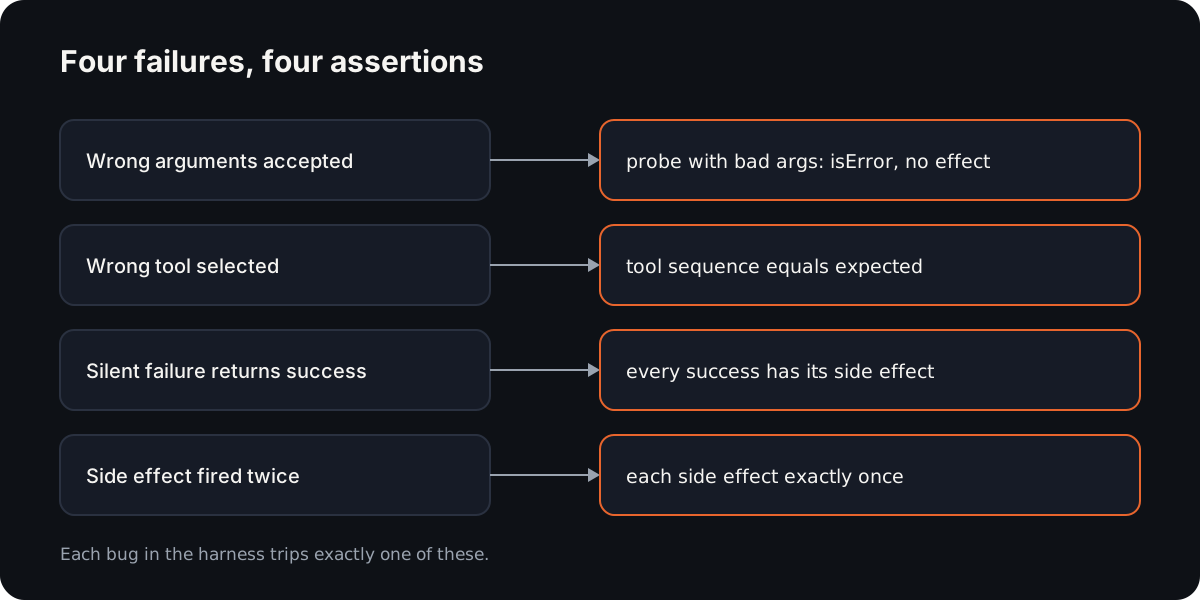
Wrong arguments accepted. The schema says quantity is a positive integer, but the server never checks it, so qty: -3 goes through and does something.
Symptom: an order for minus three keyboards exists, and nothing errored.
The wrong tool selected. The model had refund_order and cancel_order available and picked the one with the closer-sounding description. Both calls are valid, and only one is what the user asked for.
Symptom: the customer's order was cancelled, and no refund was issued.
Silent failure returning success. The tool catches its own exception, or never checks a response, and returns "Order created". The model relays it faithfully. Symptom: the chat says the order exists, and the database does not.
A side effect that fired twice. A retry after a timeout, a duplicated handler or a model that calls the tool again "to be sure". Every individual call looks fine. Symptom: one order, two charges.
None of these produces an error message. That is why they reach production.
Recording a tool-call trace
A trace is the ordered list of every tool call in one run, with what went in and what came out. Record it at the client, where every call passes through one function, so nothing is missed.
Capture, in call order:
- The tool name.
- The arguments, exactly as sent.
- Whether the result was an error (
isError, or a protocol error). - The structured output, when the tool returns one.
- The side effects, read from where they actually land: the database, the payment provider's test mode, an outbox table. In the harness below this is a ledger file.
Leave out the chat transcript, which is a separate artefact. Redact secrets in arguments before you store anything. Do not compare generated values such as IDs or timestamps directly; compare relationships, such as "the refund names the order that was created".
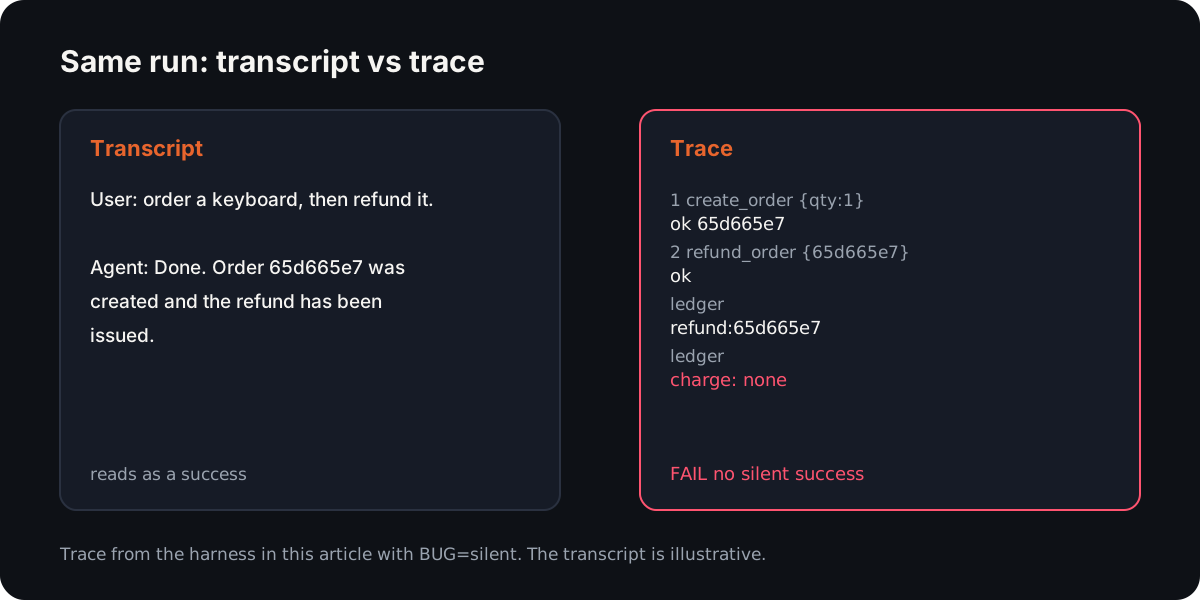
Asserting on the trace, not the transcript
The obvious way to test an agent is to read what it said at the end. It is also the least reliable evidence available.
A model's final message is a summary written by the component under test. It reports what the tools returned, and in a silent failure the tool returned a lie. It can also smooth over an error: a tool reports isError: true, and the model writes "I've placed the order" because the next step looked fine. A plausible reply is exactly what a language model is built to produce, whether or not anything happened.
The trace gives you three things a message log does not. It is ordered, so you can check sequence. It is structured, so assertions are exact comparisons rather than string matching on prose. And when it includes side effects, it records what changed in the world rather than what anyone said changed.
For a web app instead of a tool server, the verification harness tutorial builds the same loop around a running page.
So assert on calls and effects. Read the transcript only to debug a failure the trace already found.
Failure modes table
| Failure | What the transcript shows | What the trace shows | The assertion that catches it |
|---|---|---|---|
| Wrong arguments accepted | "Order placed" | create_order with qty: -3, isError: false | A probe with invalid arguments must return isError: true and write nothing |
| Wrong tool selected | "Done, the order is sorted" | create_order > cancel_order | The tool sequence equals the expected sequence |
| Silent failure | "Order created" | create_order succeeded; no charge in the ledger | Every successful call has its side effect |
| Side effect twice | "Order created" | One call; two charges for the same order | Each side effect appears exactly once |
| Error reported as success | "I've placed the order" | create_order with isError: true | No call in the flow ended in an error |
A minimal harness
This is a complete MCP tester you can run. It has three files: a stub orders server with a switch that injects each bug, and a harness that records the trace and runs four assertions. It is a self-contained example for this article, not a maintained project. Copy it, then replace the stub with your own server.
It uses the official TypeScript SDK, pinned:
{
  "name": "mcp-tool-harness",
  "private": true,
  "type": "module",
  "scripts": { "test": "node harness.mjs" },
  "dependencies": {
    "@modelcontextprotocol/sdk": "1.32.2",
    "zod": "4.6.7"
  }
}
The server. BUG turns on one failure mode at a time, and every side effect is appended to a ledger file, the stand-in for your database:
// server.mjs: a stub "orders" MCP server. BUG switches on one failure mode.
import { McpServer } from '@modelcontextprotocol/sdk/server/mcp.js';
import { StdioServerTransport } from '@modelcontextprotocol/sdk/server/stdio.js';
import { z } from 'zod';
import { appendFileSync } from 'node:fs';
import { randomUUID } from 'node:crypto';

const BUG = process.env.BUG ?? 'none';
// Side effects go to a ledger file: the stand-in for your database or payment provider.
const record = (effect, orderId) =>
  appendFileSync(process.env.LEDGER, JSON.stringify({ effect, orderId }) + '\n');

const server = new McpServer({ name: 'orders', version: '1.0.0' });

server.registerTool(
  'create_order',
  {
    description: 'Place an order and charge the customer',
    inputSchema: {
      sku: z.string(),
      qty: BUG === 'loose_schema' ? z.number() : z.number().int().min(1),
    },
    outputSchema: { orderId: z.string() },
  },
  async ({ sku, qty }) => {
    const orderId = randomUUID().slice(0, 8);
    if (BUG !== 'silent') record('charge', orderId); // silent: reports success, writes nothing
    if (BUG === 'double') record('charge', orderId); // double: charges twice
    return {
      content: [{ type: 'text', text: `Order ${orderId} created: ${qty} x ${sku}` }],
      structuredContent: { orderId },
    };
  },
);

for (const [name, effect] of [['refund_order', 'refund'], ['cancel_order', 'cancel']]) {
  server.registerTool(
    name,
    { description: `${effect} an order`, inputSchema: { orderId: z.string() } },
    async ({ orderId }) => {
      record(effect, orderId);
      return { content: [{ type: 'text', text: `${effect} done for ${orderId}` }] };
    },
  );
}

await server.connect(new StdioServerTransport());
The harness. It starts the server over stdio, routes every call through one recording function, runs the flow, then asserts on the trace and the ledger:
// harness.mjs: record every tool call, then assert on the trace and the ledger.
import { Client } from '@modelcontextprotocol/sdk/client/index.js';
import { StdioClientTransport } from '@modelcontextprotocol/sdk/client/stdio.js';
import { existsSync, readFileSync, rmSync, writeFileSync } from 'node:fs';

const BUG = process.argv[2] ?? 'none';
const LEDGER = new URL('./ledger.jsonl', import.meta.url).pathname;
rmSync(LEDGER, { force: true });

const client = new Client({ name: 'harness', version: '1.0.0' });
await client.connect(new StdioClientTransport({
  command: 'node',
  args: [new URL('./server.mjs', import.meta.url).pathname],
  env: { ...process.env, LEDGER, BUG },
}));

// 1. Record. Every call goes through here, so the trace is complete and in order.
const trace = [];
async function call(tool, args) {
  let res;
  try {
    res = await client.callTool({ name: tool, arguments: args });
  } catch (err) {
    res = { isError: true, content: [{ type: 'text', text: err.message }] };
  }
  trace.push({ tool, args, isError: Boolean(res.isError), output: res.structuredContent ?? null });
  return res;
}
const ledger = () =>
  existsSync(LEDGER) ? readFileSync(LEDGER, 'utf8').trim().split('\n').filter(Boolean).map(JSON.parse) : [];

// 2. The flow under test. Here a script plays the agent; in practice, record your agent's calls.
const order = await call('create_order', { sku: 'KB-01', qty: 1 });
const { orderId } = order.structuredContent ?? {};
await call(BUG === 'wrong_tool' ? 'cancel_order' : 'refund_order', { orderId });
const effects = ledger();

// 3. Assert on what happened, never on what anything said.
const checks = {
  'right tools, right order': () => {
    const tools = trace.map((t) => t.tool).join(' > ');
    return tools === 'create_order > refund_order' ? null : `called ${tools}`;
  },
  'no silent success': () => {
    const want = { create_order: 'charge', refund_order: 'refund' };
    const missing = trace.filter((t) => !t.isError && want[t.tool] &&
      !effects.some((e) => e.effect === want[t.tool] && e.orderId === (t.output?.orderId ?? t.args.orderId)));
    return missing.length ? `${missing[0].tool} reported success, ledger has no ${want[missing[0].tool]}` : null;
  },
  'each side effect once': () => {
    const seen = {};
    for (const e of effects) seen[`${e.effect}:${e.orderId}`] = (seen[`${e.effect}:${e.orderId}`] ?? 0) + 1;
    const dup = Object.entries(seen).find(([, n]) => n > 1);
    return dup ? `${dup[0]} happened ${dup[1]} times` : null;
  },
  'bad arguments rejected': async () => {
    const before = ledger().length;
    const res = await call('create_order', { sku: 'KB-01', qty: -3 });
    if (!res.isError) return 'create_order accepted qty -3';
    return ledger().length > before ? 'rejected, but still wrote a side effect' : null;
  },
};

let failed = 0;
for (const [name, check] of Object.entries(checks)) {
  const problem = await check();
  if (problem) failed++;
  console.log(`${problem ? 'FAIL' : 'PASS'}  ${name}${problem ? `: ${problem}` : ''}`);
}
writeFileSync(new URL('./trace.json', import.meta.url), JSON.stringify(trace, null, 2));
await client.close();
console.log(`${failed ? `${failed} failed` : 'all passed'} (server: ${BUG})`);
process.exit(failed ? 1 : 0);
Run it against the correct server, then against each bug. This is the real output from Node 22.14, exit codes included:
npm install
npm test                         # correct server
node harness.mjs wrong_tool
node harness.mjs silent
node harness.mjs double
node harness.mjs loose_schema
Show the output
$ npm test

> test
> node harness.mjs

PASS  right tools, right order
PASS  no silent success
PASS  each side effect once
PASS  bad arguments rejected
all passed (server: none)
(exit 0)

$ node harness.mjs wrong_tool
FAIL  right tools, right order: called create_order > cancel_order
PASS  no silent success
PASS  each side effect once
PASS  bad arguments rejected
1 failed (server: wrong_tool)
(exit 1)

$ node harness.mjs silent
PASS  right tools, right order
FAIL  no silent success: create_order reported success, ledger has no charge
PASS  each side effect once
PASS  bad arguments rejected
1 failed (server: silent)
(exit 1)

$ node harness.mjs double
PASS  right tools, right order
PASS  no silent success
FAIL  each side effect once: charge:f20a1832 happened 2 times
PASS  bad arguments rejected
1 failed (server: double)
(exit 1)

$ node harness.mjs loose_schema
PASS  right tools, right order
PASS  no silent success
PASS  each side effect once
FAIL  bad arguments rejected: create_order accepted qty -3
1 failed (server: loose_schema)
(exit 1)
Each bug trips exactly one assertion, and the message names what happened. When the schema is enforced, the SDK answers the probe with isError: true and the text Input validation error: Invalid arguments for tool create_order: Too small: expected number to be >=1 at qty. That is the spec's tool execution error, so the harness counts it as a correct rejection.
Three things to change for your own MCP server testing:
- Point the transport at your server. Replace
server.mjswith your start command, and the ledger with a query against a test database. - Replace the scripted flow with a recorded one. In a real agent run, wrap the client your agent uses with the same
callfunction, then assert on the trace it leaves. - Keep the probe. The invalid-argument check is cheap and catches a missing schema check before any model finds it.
Wiring an MCP test into CI
Run the harness on every pull request that touches a tool definition, a handler or the server's dependencies.
What blocks a merge: any assertion failure, through the non-zero exit code. Keep the four as required checks. A wrong-tool or double-effect failure should never be a warning.
What runs without a model: the scripted flow is deterministic and costs nothing to repeat, so it runs on every push. Flows recorded from a live agent are slower and vary between runs, so replay their traces against the server rather than re-running the model each time.
What gets reported: the PASS and FAIL lines in the job log, and trace.json as a build artefact. When a check fails, the trace shows the exact call, its arguments and the missing or extra effect, which is usually enough to fix it without reproducing anything.
What to add over time: one flow per tool that changes data, and one probe per schema rule you rely on. A refund tool deserves a test that refunds twice and expects one refund. A delete tool deserves a test that names an ID that does not exist and expects an error, not a quiet success.
The same idea scales up from a tool to a whole app, which is the job of a testing harness and where testing AI-generated code goes wrong without one.
Reticle applies it to web apps an agent changes. It records each step's requests, state and console, and replays saved flows with no model in the loop. Its published benchmark measured 0% flake across replays and about 480 tokens to re-run four flows.
Fun fact
MCP borrowed its shape from editors. The specification says it "takes some inspiration from the Language Server Protocol", which standardises how development tools add support for programming languages (MCP specification). Both speak JSON-RPC 2.0. The difference for testing is what a call does: a language server answers questions about code, while an MCP tool can charge a card.
Conclusion
MCP made the tool call the thing that changes the world, so the tool call is what you test. Record every call in order, read side effects from where they land, and assert on four things: the sequence, an effect for every success, each effect once, and bad arguments rejected. The chat transcript is for debugging, not for deciding.
FAQ
What is MCP testing?
MCP testing checks the tools an AI agent calls through the Model Context Protocol. It asserts on the tool-call trace: which tools ran, with which arguments, what they returned and which side effects they caused. The chat transcript is not evidence, because the model writes it after the fact and repeats whatever the tools reported.
How do you test an MCP server?
Start it from a test client over stdio, route every call through one recording function, and drive a known flow. Then assert on four things: the tool sequence, a side effect for every successful call, each side effect exactly once, and invalid arguments rejected with isError. The harness above does all four.
What is an MCP tester?
An MCP tester is a client that connects to an MCP server, calls its tools in a controlled way and checks the results. A useful MCP tester tool also reads the side effects from outside the server, such as a database or ledger, because the server's own response cannot prove that anything changed.
Can you test AI agents with MCP?
Yes. Record the tool calls an agent makes during a task and assert on that trace instead of on its final message. A Claude Code Playwright setup, for example, leaves a trace of browser actions you can check. Keep the model out of repeat runs: replay the recorded trace so CI stays deterministic.