On this page
Code is now written faster than anyone can check it. The usual answer, more tests, misses the point of AI code testing: agent-written changes usually arrive with tests, and those tests pass. The gap is not coverage. It is what the tests assert on.
Developers feel this already. In the 2025 Stack Overflow survey, 66% named "AI solutions that are almost right, but not quite" as their top frustration, and 45.2% said debugging AI-generated code is more time-consuming (Stack Overflow Developer Survey 2025). "Almost right" is the shape of every failure below: the screen looks finished and something underneath is wrong.
Checking that a change did what was asked, and not just that it compiles and renders, is AI verification. This post is the list of what it has to catch.
AI code testing: the seven failure modes
These are the ways an agent's change breaks while its tests stay green. None is exotic. Each one shows up because the author, human or model, checked what the screen showed.
1. Mock or hardcoded data presented as a real result
Symptom: the dashboard shows numbers, the order list shows orders, and none of it came from the backend. A fixture, a placeholder array or a mocking handler left switched on is feeding the UI.
Why a unit test misses it: the unit test mocks the same boundary, so it passes against the same fake data.
2. Handlers wired to nothing
Symptom: the button exists, has the right label and is clickable. The onClick points at a stub, or the form posts to a route that was renamed. Nothing happens, quietly.
Why a unit test misses it: it tests the handler function, and the function is fine. Nothing tests that the button calls it.
3. UI state that disagrees with the store
Symptom: the cart badge says 3, the store holds 2. The status chip says "Paid" from a stale cache while the record says "pending".
Why a unit test misses it: the component and the store are each tested in isolation, and each is correct alone.
4. Double submits
Symptom: one click, two charge requests. A missing disabled state, a retry wrapper, or an effect that runs twice in development fires the mutation again.
Why a unit test misses it: it calls the submit function once and asserts it was called. It cannot see the second network request.
5. Swallowed 500s
Symptom: the request failed, a catch block logged it or ignored it, and the UI showed success anyway.
Why a unit test misses it: the fetch is mocked to succeed, so the failure branch is never exercised against a real response.
6. A fixed bug that breaks an adjacent flow
Symptom: the agent fixes coupon rounding on checkout. The same helper also runs on refunds, and refunds are now off by a cent.
Why a unit test misses it: the agent updated the tests it touched to match the new behaviour. The refund path has no test that would notice.
7. A silent regression in a flow nobody re-ran
Symptom: the signup flow broke two commits ago. Nobody re-ran it, because nothing in the diff mentioned signup.
Why a unit test misses it: this is agent-generated code regression testing in its plainest form. A regression in a flow is invisible to tests that only run the code that changed.
Why unit tests miss all seven, and end-to-end tests miss five
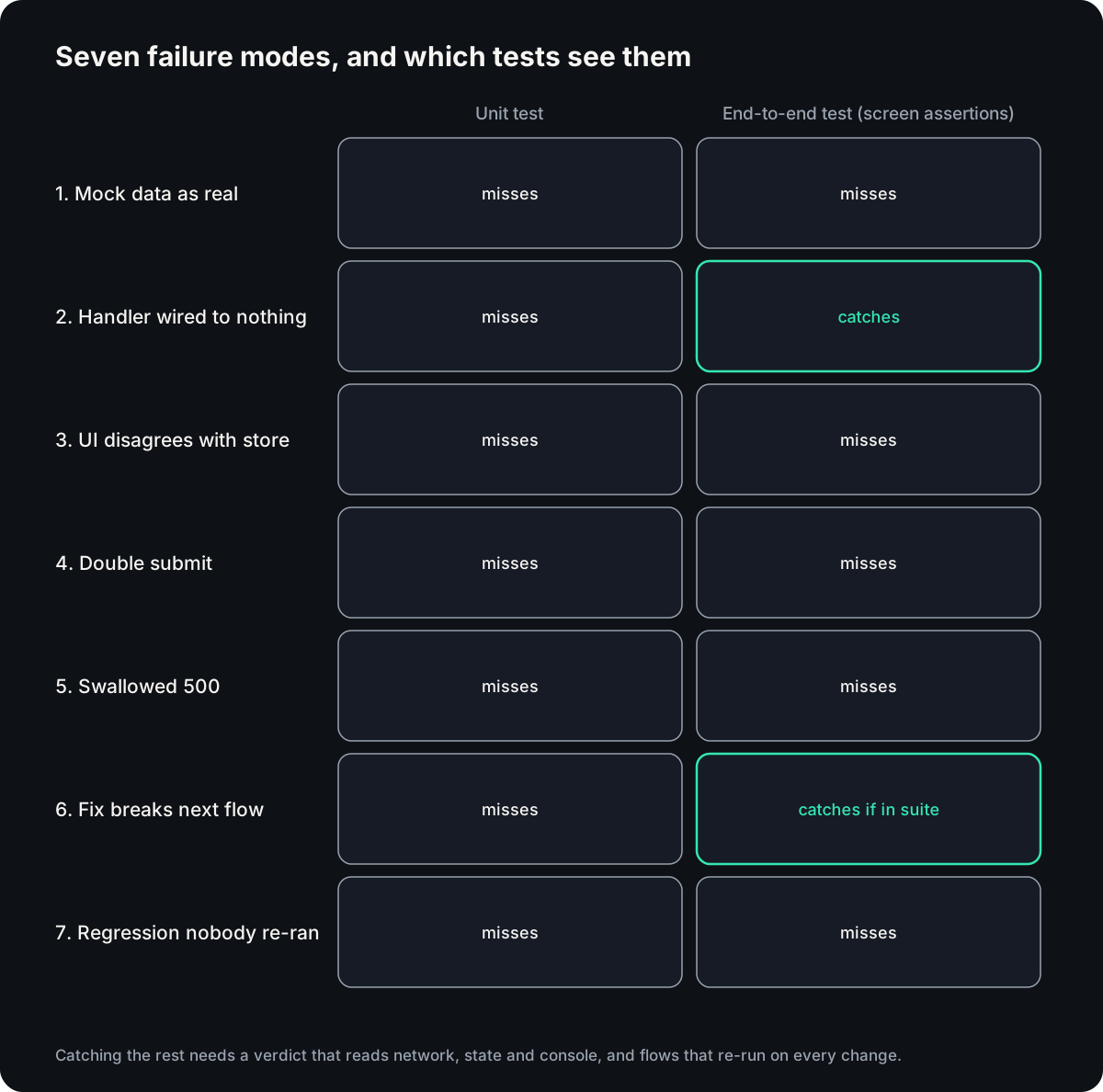
Unit tests check functions in isolation, with their boundaries mocked. Every mode above lives at a boundary: between the UI and the network, the UI and the store, or one flow and another. A unit test is blind to all seven by construction.
End-to-end tests drive the real app, so they do better. They catch handlers wired to nothing (2), because clicking a dead button changes nothing on screen, and a fix that breaks an adjacent flow (6), as long as that flow is in the suite.
They miss the other five, because most end-to-end tests assert on what the page shows:
- Mock data renders like real data (1).
- A stale chip looks the same as a correct one (3).
- One confirmation appears even when two charges fired (4).
- A swallowed 500 still renders the success state (5).
- A flow nobody runs cannot fail (7).
That is why AI-generated code passes review and breaks in production. A vibe code detector that reads the diff for suspicious patterns cannot see these either. They are runtime facts, not code smells.
How to test AI-generated code by hand, step by step
You do not need a tool to start. Your browser's devtools are enough; tools only make it faster and repeatable.
- Write the expected outcome before the code. "One click, one charge request, one order row that survives a reload." Give it to the agent with the task.
- Separate the author from the grader. The check should not be written by the same session that wrote the code. A teammate, a separate agent session or an independent tool all count. If the agent works through tools, an MCP test on its tool-call trace is the same idea one level down.
- Run the app and drive the changed flow. Not the unit tests: the real flow a user takes.
- Watch the network tab. Count the requests per action and read the status codes. Two POSTs for one click is a bug even if the screen is right.
- Reload and check again. Anything that should persist must survive a reload. This catches mock data in seconds.
- Read the console. Any new error is a failure, even with a working screen.
- Compare what is shown with what is stored. Check the store or the database row behind the number on screen.
- Keep the check. Turn the flow into a regression test so it runs on every change without anyone remembering to ask. A recorded flow is also the best input for AI test case generation.
Three more failures are worth watching for while you do this. A forbidden call is a request that must never fire, such as a reverted endpoint or an N+1 loop. Missing validation means the form accepts "abc" and saves it as a number. A blast radius bug is when the intended change works but unrelated state, not even on screen, changed too.
What a verdict has to read to catch them
To catch all seven, a check has to read what the app did, not only what it drew:
| Evidence | Catches |
|---|---|
| DOM outcome: what the user saw | 2, and the visible half of the rest |
| Network result: which requests fired, how many times, with what status, to which host | 1 (request went to a mock or nowhere), 4 (two charges), 5 (the 500) |
| Application state: what the store holds after the action | 3 (UI vs store) |
| Console: errors and caught exceptions | 5, when the catch block logs |
Source location: the file:line behind a failing element | Turns any of them into a fix instead of a hunt |
Re-running every saved flow on every change covers 6 and 7, provided the re-run is cheap enough to do every time.
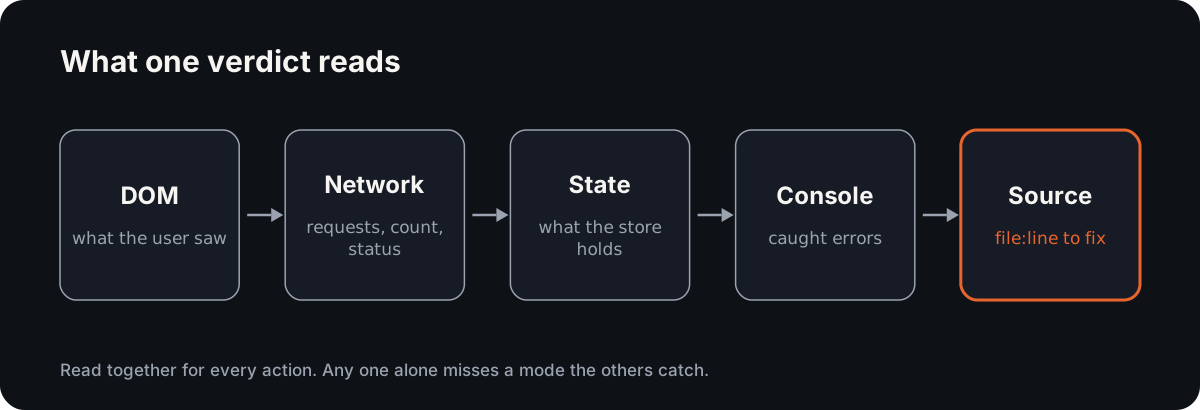
Reticle is built as that mechanism. It runs inside the app in development, reads DOM, network, store and console together for each action, and names the source line when a check fails. Saved flows replay on every change with no model in the loop, so the flows nobody thought to re-run get re-run anyway.
The harness: a seeded-bug benchmark you can run
Claims about catching bugs are cheap, so the benchmark is public. It injects an 88-bug registry into a controlled app: 86 real regressions and 2 false-positive traps, where flagging a problem would itself be wrong. Each tool runs its native check against each buggy build. A tool scores a catch only if its check fails on the buggy build and passes on the clean one.
git clone https://github.com/reticlehq/reticle
cd reticle && pnpm install
node bench/pw-vs-reticle/run.mjs
The registry is bench/pw-vs-reticle/bugs.mjs, and the results land in results.json. To re-verify your own app's saved flows the same way in CI, the CLI is npx @reticlehq/server verify <url>, which replays them against a preview and exits non-zero when one fails. The verification harness tutorial plants a hard-coded value in a request and shows the replay catching it.
The result
On the 88-bug registry, Reticle caught 85 of 88 and a Playwright script on the same app caught 59 of 88 (false-green scorecard). Neither tool flagged the clean build.
Two of Reticle's three misses are the false-positive traps, which are not real bugs. The third, a stale iframe, is a genuine miss and is counted as one. On the 26 critical bugs, the ones that corrupt data or hide a failure, the split is 26 against 9.
The gap sits where this list says it should: state that disagrees with the UI, swallowed statuses, records that are wrong while the screen is right. On what a user or the network can see directly, the two tie.
If you want saved flows replayed on every pull request without running it yourself, start free on the hosted platform, or install the open-source SDK and keep it on your machine.
What still escapes
Pixel regressions. A wrong shade or a two-pixel shift changes no state and no request. Screenshot diffing catches it; a state-based verdict does not.
Cross-browser rendering. The store says the same thing in every browser. A layout that breaks in one engine needs a cross-browser run.
Third-party flows. A payment provider's hosted page, an OAuth consent screen or an embedded widget runs code you do not build. You can drive it and watch your side of the network, but you cannot read its state.
When those matter, keep the tools built for them, and treat this layer as the one that catches what they cannot. For tests that fail for reasons unrelated to the product, see flaky tests. For the four layers of tooling around all of this, see AI test automation.
Fun fact
The phrase "vibe coding" is younger than most of the code it describes. Andrej Karpathy coined it on 2 February 2025, describing a way of working where you "forget that the code even exists". Collins English Dictionary made it the Word of the Year for 2025 (Wikipedia: Vibe coding).
Forgetting the code exists is fine. Forgetting to check what it did is the expensive part.
Conclusion
AI-generated code fails in seven repeatable ways, and all seven live at boundaries a unit test mocks and a screen-level test cannot read. Good AI code testing catches them with a verdict that reads network, state and console alongside the DOM, and with flows that re-run on every change. Keep screenshots and cross-browser runs for what state cannot see.
FAQ
How do you test AI-generated code?
Test it by what it does at its boundaries, not only by unit tests. Drive the real flow, then check the network requests, the application state and the console, not just the screen. Re-run saved flows on every change, because AI-generated code often breaks a flow the diff never mentioned.
Why do AI-generated tests pass when the code is broken?
They usually assert on what the screen shows or on mocked boundaries. Mock data, swallowed errors, double submits and stale UI state all look correct on screen. If the same agent wrote the code and the test, the test also encodes the agent's assumptions, so it passes for the same reason the bug exists.
Is debugging AI-generated code harder than debugging human code?
Often it is slower: 45.2% of developers in the 2025 Stack Overflow survey said so. The code looks finished and plausible, so the bug hides in a boundary nobody read. A failing check that names the request, the state and the source line shortens that search more than reading the diff does.
Why Reticle
Your agent says it works. Reticle checks.
- Checks each change inside the running app: network, state and console, not a screenshot.
- Returns a pass or fail with the evidence and the file:line to fix.
- Open-source SDK on your machine, or the platform on every preview and PR.
No credit card required.