On this page
- Why the tests it writes tend to pass
- Step one: give it the cases before it writes code
- Step two: make the command the source of truth
- Step three: let it run things without asking every time
- Step four: know what it is genuinely good at
- The part unit tests will not save you from
- Where Reticle fits
- Keep your real test suite
- Fun fact
- Conclusion
- FAQ
You ask Claude Code to add a feature and write tests for it. Two minutes later you get a tidy summary: implemented, tested, all green. You pull the branch, run the suite yourself, and something is off. Either a test is asserting something trivially true, or the feature is broken in a way no test in the file would ever notice, or the command never ran at all.
Codex does the same thing with a different accent. If you use Claude Code and Codex for testing, you have met both.
This is not a prompt problem and you cannot fix it by being nicer or more specific. It is a structural problem, and once you see it, the setup that fixes it is fairly small. Its last step has a name, AI verification: checking the running app instead of trusting the summary.
Why the tests it writes tend to pass
When the agent writes the feature and then writes the test, both come from the same understanding of the code. If that understanding is wrong, the test is wrong in the same direction and it goes green. Nothing was verified. The model checked its own homework against its own answer key.
Humans do this too. The difference is that a human who writes a function and a test from memory usually still opens the app and clicks the thing once. The agent does not, unless you make it.
So the first rule is boring: whatever grades the work should not be the thing that wrote the work. Everything below is a way of arranging that.
Step one: give it the cases before it writes code
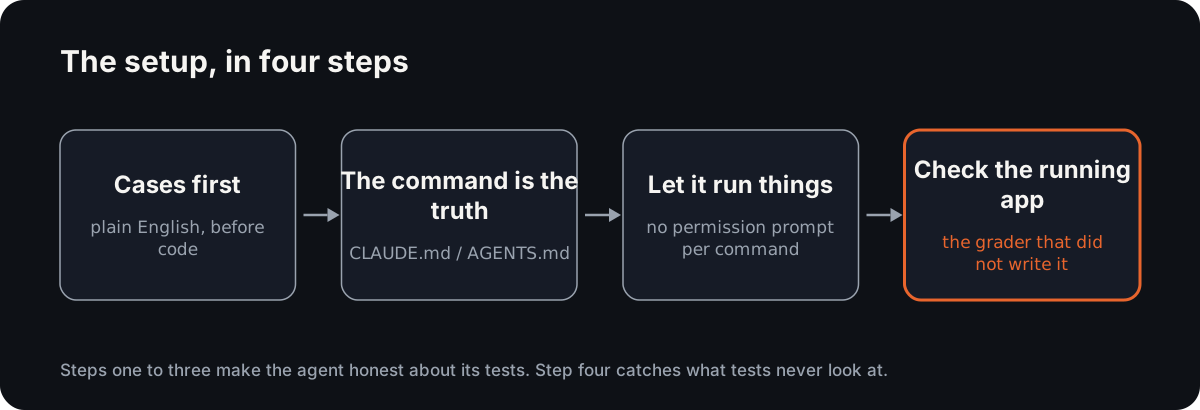
The most useful thing you can do costs one extra message.
Before writing any code, list the test cases in plain English. Include what should fail, not just what should work. Wait for me.
You read a list of twelve lines and spot the three missing ones in about fifteen seconds. That is the cheapest moment in the whole process to catch a missing case. After the code exists, the same fix costs you a review, a rewrite, and a re-run.
Both tools do this well. It also gives you a written spec the agent can be held to later, which matters when the summary starts drifting from reality.
Step two: make the command the source of truth
The single most common failure is the agent reporting success it did not observe. It edited the file, it did not run anything, and the summary is a prediction dressed as a result.
Fix this in your project instructions, not in individual prompts. Claude Code reads CLAUDE.md, Codex reads AGENTS.md, and both files sit at the repo root and get picked up on every session. (The Claude-only version of this setup is in using Claude Code for QA automation.) Put this in yours:
Before you report anything as done, run:

  npm run typecheck && npm test

Paste the real output, including failures. Do not summarise it.
If it fails, keep working. "Should pass" is not an outcome.
Two things happen. The command runs because it is written down, not remembered. And you get raw output instead of a paraphrase, which is the only part of the message that is evidence.
While you are in there, add the things it cannot guess: how to start the dev server, which test file maps to which area, which directories are generated and should never be edited, and the one flaky suite everyone knows to ignore. Most bad agent behaviour is missing context rather than bad judgment.
Step three: let it run things without asking every time
An agent that has to ask permission for every command will stop running commands. It learns, correctly, that the cheapest path to a finished-looking answer is to not run anything.
In Claude Code, allow the specific commands you actually want it to run freely. In Codex, pick an approval mode that lets it execute in the workspace on its own. In both, keep it on a branch or a worktree so being wrong is cheap. The goal is that running the tests is less friction than skipping them.
One caveat worth knowing: Codex runs sandboxed with network access off by default. If your tests hit a local service or need to install something mid-run, they will fail in a way that looks like a code bug and is not. Check that before you spend an hour debugging a phantom.
Step four: know what it is genuinely good at
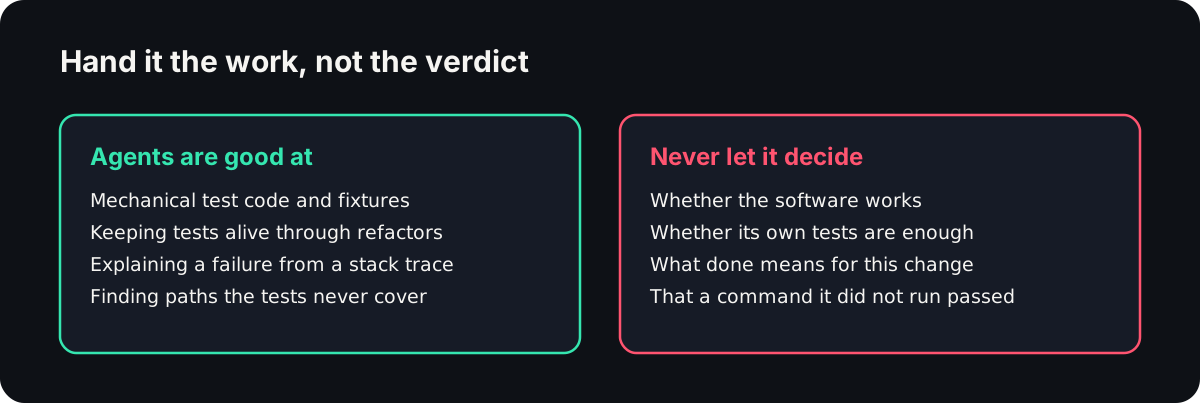
Used deliberately, coding agents are very strong at:
- Mechanical test code. Fixtures, factories, setup and teardown, twenty parameterised variants of a case you already approved.
- Keeping tests alive through refactors. Renames and signature changes are exactly the drudgery you want gone.
- Explaining a failure. Paste a stack trace and it will usually beat you to the cause.
- Finding the untested paths. Ask what a file's tests do not cover and the answer is often uncomfortable and correct.
Notice that none of those ask the model to judge whether the software works. That is the line. On this side of it, agents are a large speedup. On the other side, they are a confident narrator.
The part unit tests will not save you from
Everything above gets you a solid unit and integration layer. The bugs that reach users are usually somewhere else, in the space between the browser and the backend, and they have a signature: the screen looks completely fine.
- The page renders, and
POST /api/ordercame back a 500. - The toast says "Saved" and the store still holds the old value.
- One click fired the payment request twice.
- A component throws in an effect, React swallows it, and the console has the only trace.
Every one of those passes a screenshot check. It passes a "does the success message appear" check too. The DOM is not the program, so looking at the DOM cannot tell you what the program did.
This is where agent testing usually stalls. You ask the agent to check that checkout works, it drives a browser, it sees the confirmation text, it reports green, and the order never made it to the database.
There is a second problem with the browser step. When a model drives the flow, it is making fresh decisions each run, so it can give you three answers for the same code. Once a suite is flaky, people stop reading it, and an unread suite is worse than no suite because you still pay for it.
Where Reticle fits
Reticle is the other half of the loop. It is a free, open source SDK that runs inside your app in development, and it is the grader that did not write the code.
Your agent asks it for proof. Reticle opens the running app, drives the flow, and then reads what actually happened underneath: the network calls and their status codes, the internal state, the console, the React commits. It comes back with a pass or a fail and, when it fails, the file and line that caused it.
Because it reads the program instead of the picture, it catches the silent class above: the 500 behind a clean page, the UI that disagrees with the store, the double charge.
Because a recorded flow replays deterministically instead of being re-driven by a model, the same input gives you the same verdict every time, and a four-flow suite costs roughly 480 tokens to run (benchmark).
That last number is the part that matters more than it sounds. A check that costs a dollar and ninety seconds gets skipped by the third iteration. A check that costs a fraction of a cent and returns in a second becomes something the agent does without being reminded.
RETICLE_INSTALL_SOURCE=blog npx @reticlehq/server init
Then one line in your CLAUDE.md or AGENTS.md:
Verify the change with Reticle before reporting it done.
Report the verdict it returns, not your own read of the screen.
From there the agent starts catching its own mistakes before you see them, which is the only version of this that saves you any time at all.
Keep your real test suite
None of this replaces Playwright or your CI gate. Those still decide what ships, they cover the browsers you support, and they catch visual regressions Reticle deliberately does not look at.
The split we recommend: your suite gates the release, Reticle gates the edit, while the agent is still in the loop and the fix is still cheap. The measured trade-offs, losses included, are in the three-tool comparison, and the reason this matters at all is in the bottleneck moved.
And the rule underneath all of it stays the same. Let the agent write. Do not let it be the one who decides it worked.
Fun fact
Kent Beck says he "rediscovered" test-driven development rather than invented it. As a kid he read one of his father's programming books, which told you to type the expected output tape by hand before writing the program. He didn't understand it, forgot it, and only remembered it years later while building SUnit, as The Pragmatic Engineer's profile of Beck tells it. Writing the expected result first is older than most of the languages you'd write it in.
Conclusion
Claude Code and Codex are fast at writing test code and slow to admit they did not run it. The setup that holds is small: test cases before code, the test command written into CLAUDE.md or AGENTS.md, permission to run it, and a grader for the running app that did not write the feature.
Start with step two today. Add the command block to your project instructions and see how many "all green" summaries survive real output.
FAQ
How do I use Claude Code and Codex for testing?
Use Claude Code and Codex for testing by letting them write the test code while something else decides whether it passed. Ask for test cases before code, put the test command in CLAUDE.md or AGENTS.md, let the agent run it, and check the running app with a grader that did not write the change.
Why do the tests my coding agent writes always pass?
The tests an agent writes tend to pass because the feature and the test come from the same understanding of the code. If that understanding is wrong, the test is wrong in the same direction and goes green. Nothing independent checked the work, so the model graded its own homework against its own answer key.
What should I put in AGENTS.md or CLAUDE.md for testing?
Put the exact test command in AGENTS.md or CLAUDE.md, with an instruction to paste the real output, failures included, before reporting anything done. Add what the agent cannot guess: how to start the dev server, which test file covers which area, which folders are generated, and which flaky suite to ignore.
Why do Codex tests fail when the code looks fine?
Codex tests can fail on correct code because Codex runs sandboxed with network access off by default. A test that calls a local service or installs a package mid-run fails in a way that looks like a code bug. Check the sandbox and network settings before you spend an hour debugging a problem that is not in your code.
Why Reticle
Your agent says it works. Reticle checks.
- Checks each change inside the running app: network, state and console, not a screenshot.
- Returns a pass or fail with the evidence and the file:line to fix.
- Open-source SDK on your machine, or the platform on every preview and PR.
No credit card required.