On this page
Most lists of regression testing tools compare browsers, languages, integrations and price. Those matter, but they skip the question that decides whether a tool is any use: what does it read to conclude pass or fail?
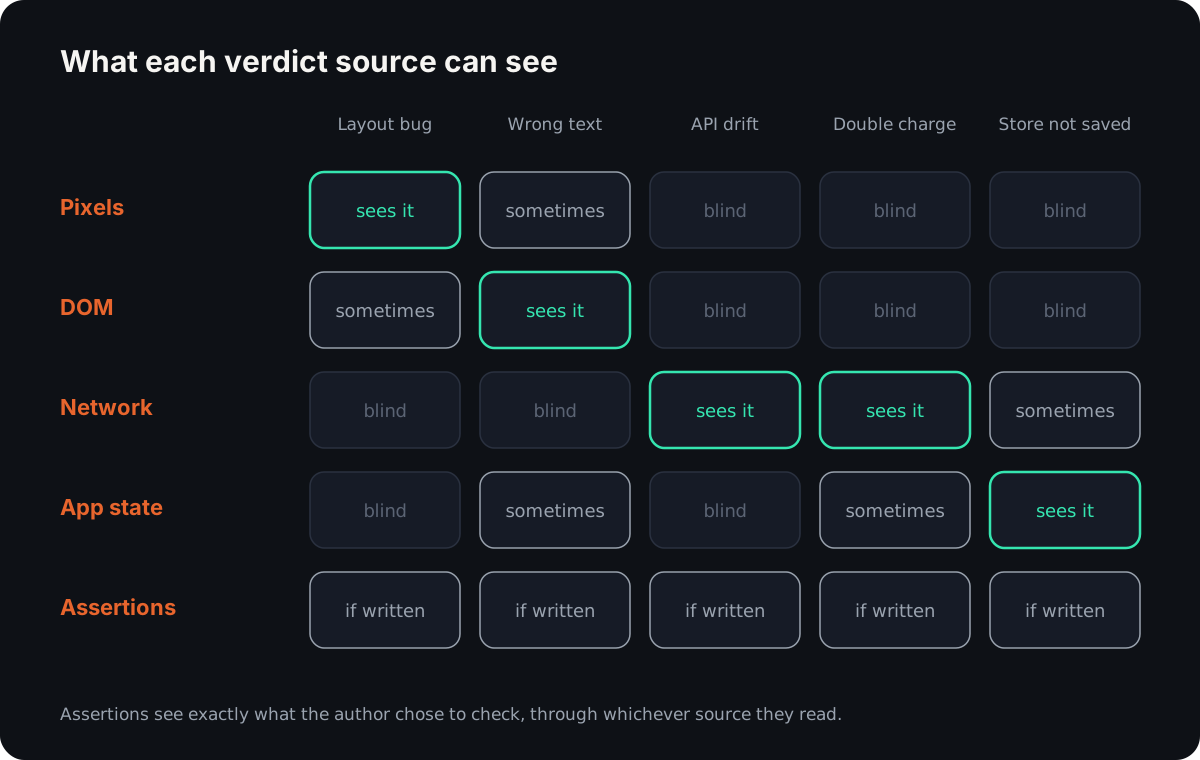
A tool that compares screenshots cannot see a double charge that renders the same. A tool that checks API contracts cannot see a broken button. This page compares nine tools, the part of automated testing that guards what already worked, on that one axis.
If what you need is a check on what your web app did, not just what it showed, you can Start a 14-day trial (sign in, then add a card under Billing; the free plan needs none) or read the open-source SDK first.
Regression testing is where AI test automation is sold hardest, so we will be specific about what each kind of tool can and cannot see.
What regression testing has to catch
A regression is behaviour that used to work and no longer does. In practice it arrives in three shapes:
-
A changed behaviour in a covered flow. The checkout test exists, and checkout broke. Every tool here is built for this one.
-
A changed behaviour in an adjacent, uncovered flow. You changed the cart, and the saved-addresses page broke. Nothing ran against it, so nothing failed.
-
A silent failure that returns success. The page says "Order placed", the API returned 200, and the order row was never written. Or it was written twice.
The third class is the expensive one, because the suite stays green. Whether a tool can catch it depends almost entirely on its verdict source: what it compares against what.
The five categories of regression testing software
| Category | Verdict source | Best fit | Blind spot |
|---|---|---|---|
| Record-and-replay | Assertions or screenshots captured when the flow was recorded | Stable flows you want covered fast | Only what was recorded; UI changes break the recording |
| AI-generated | Checks a model writes, or a model's judgement at run time | Broad coverage without hand-written code | The model chooses what "correct" means; healed steps can pass on the wrong element |
| Visual regression | Pixels against an approved baseline | Layout, CSS and cross-browser rendering | Anything that renders the same: wrong data saved, a request fired twice |
| API contract | Request and response shape against a contract | Services owned by different teams | The UI, and side effects behind the response |
| Unit and component | Assertions on a function's or component's output | Logic, fast feedback on every save | Integration and a real browser |
No category covers all three failure classes, which is why teams happy with their regression suite usually run two or three. Where regression checks sit among the other kinds of automated testing is mapped in the field guide.
Nine regression testing tools, by what decides pass or fail
Every cell comes from the tool's own docs, pricing or product page, linked below. Where the docs do not make the mechanism clear, the cell says "unclear".
| Tool | Category | Verdict source | What it catches | What it misses | Price shape |
|---|---|---|---|---|---|
| Playwright | Record-and-replay (codegen) | Assertions; pixels with toHaveScreenshot() | What you assert; pixel changes in Chromium, Firefox, WebKit | Anything not asserted; baselines differ across OS and hardware | Free, open source |
| Meticulous | Record-and-replay (sessions) | Pixels: a snapshot after each event, against the base commit | Visual changes across recorded user sessions | Real backend behaviour: responses are mocked by default | Not published (demo) |
| testRigor | AI-generated (plain English) | Assertions on page text, OCR or AI; optional screen compare | User-visible behaviour described in English | Whatever the English spec does not check | Free public tier; paid private plans |
| mabl | AI-generated (agentic) | Assertions plus automatic checks; how visual changes are judged: unclear | JavaScript errors, broken links, visual changes, slowdowns | Unclear from public pages | Quote; credit-based; 14-day trial |
| Applitools Eyes | Visual regression | Pixels plus DOM structure | Layout and visual regressions across 100+ browsers and viewports | Logic and data errors that render the same | Per checkpoint; higher tiers on request |
| Percy | Visual regression | Pixels against an approved baseline | Pixel-level changes across browsers and widths | Anything that does not change pixels | Free tier (5,000 screenshots/month), then per screenshot |
| Pact | API contract | Network: requests and responses against a contract | Breaking changes between services before deploy | Side effects of a request; the UI | Open source; PactFlow free tier and paid plans |
| Jest | Unit and component | Assertions; snapshots of serialised output | Changes in a unit's or component's output | Real browser rendering (runs in Node or jsdom) | Free, open source |
| Reticle | AI-generated (agent drives once, then replays) | App state, network, console and DOM | Silent failures: a double submit, a store that never updated, a console error | Pixels, cross-browser rendering, native mobile | Open-source SDK and free plan; paid platform |
Playwright. Codegen records your clicks into test code and adds the assertions you pick from its toolbar. toHaveScreenshot() compares against a reference with the pixelmatch library, and its docs say to "run tests in the same environment where the baseline screenshots were generated."
Meticulous. A script tag records real sessions, and replays compare a "visual snapshot after dispatching each event" with the base commit (how it works). By default it "mocks out the responses from your backend", which keeps tests side-effect free and also means the real backend is not under test.
testRigor. Tests are plain English, such as check that page contains "Welcome, Peter!", with variants that read the screen "using OCR" or "using AI" (language docs). compare screen to previous version adds a pixel check.
mabl. Its regression page says it will "automatically detect Javascript errors, broken links, visual changes, and performance slowdowns" (mabl). Its help centre blocked our reader, so we could not confirm how visual changes are judged. The cell says "unclear" for that reason.
Applitools Eyes. It combines "computer vision with structural DOM analysis" and renders one captured state "across 100+ browsers and viewports" (Eyes).
Percy. Percy "compares new screenshots against previously approved ones (baseline)" (docs), and a person approves each change. The free plan includes "5000 free monthly screenshots" (pricing).
Pact. Each request in the contract is replayed against the provider, and "the actual response it generates is compared with the minimal expected response" (how Pact works). Its FAQ is plain about the limit: Pact "does not test the side effects of a request" (FAQ).
Jest. Assertions plus snapshot tests that fail "if the two snapshots do not match" (snapshot docs). It runs in Node, or a browser-like environment through jsdom, not a real browser. How it compares with Vitest, pytest, Playwright and Cypress is in test automation frameworks.
Reticle. An SDK in your build records each step's requests, store values and console. A coding agent drives a flow once, and saved flows replay with no model in the loop. It works on React, Next.js, Vue, Svelte and Angular.
Three tools beat Reticle on a stated axis. Applitools Eyes and Percy beat it on visual regressions: Reticle reads structured events, not pixels, and does not compare browsers. Pact beats it on service contracts, since it needs no browser and no deployed app. Jest beats it on cost and speed for logic: no browser, no tokens, and it runs on every save.
The maintenance tax
Every regression suite has an upkeep cost that pricing pages leave out: the time spent changing tests that failed because the product changed on purpose. It is easiest to see as the work each category generates per intended change:
- Record-and-replay: re-record, or repair locators, in each flow the change touched.
- AI-generated: review what the healer changed, and check it did not heal onto the wrong element.
- Visual regression: approve new baselines for every changed screen, in every browser and width.
- API contract: update the contract when a field changes, on both sides.
- Unit and component: update the assertions and snapshots for the changed unit.
To put a yearly number on it, use your own figures. A team that ships 30 intended UI changes a month, where each one breaks three recorded tests at 15 minutes per fix, spends about 270 hours a year on upkeep. Those are example inputs, not a benchmark; count your own for a month.
Record-and-replay and AI-generated suites decay fastest, because they are bound to the structure of the UI and the UI is what changes most. mabl advertises cutting maintenance "by up to 95%" (auto-healing), which tells you how large the tax is.
Healing lowers the repair work and adds a review cost; we covered that trade in self-healing tests. The other cost is noise: a suite that fails for reasons unrelated to the change trains people to ignore it, which is how flaky tests end up muted.
Cost per re-run
A regression suite earns its keep by re-running the same checks on every change, so the cost that compounds is the cost per re-run.
A compiled suite (Playwright, Jest, Pact) costs CI minutes and zero model tokens. Nothing here beats that. The cost appears when a model drives the browser on every run, which is how AI regression testing tools built on an agent re-check a flow.
In our published benchmark, re-verifying a four-flow suite by replaying saved flows cost about 480 tokens. Re-driving the same four flows with an LLM cost about 120,000 tokens through Playwright MCP and about 129,000 through Chrome DevTools MCP. That is about 250x. We measured tokens, not wall-clock time, so we do not quote a time ratio.
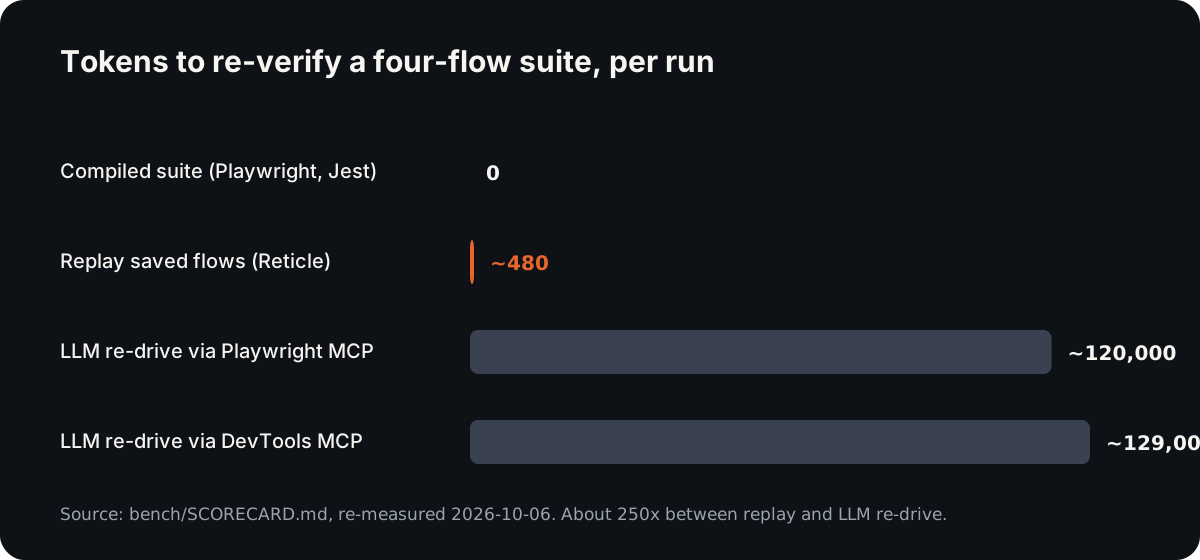
The same scorecard reports 0% flake across eight identical replays of one flow, since no model samples a different path each time.
Which regression testing tool fits your team
| Team and codebase | Recommendation |
|---|---|
| Small team, logic-heavy code, few UI flows | Jest for the logic, and a handful of end-to-end tests for the money paths |
| Design-heavy frontend that must look right in several browsers | Percy (free tier to start) or Applitools Eyes |
| Several teams, each owning services that call each other | Pact, before adding more end-to-end tests |
| QA team without dedicated coders, many web and mobile flows | testRigor or mabl |
| An existing suite that rarely lets a bug escape | Keep what you have. Fix the flakes before buying anything |
| Coding agents writing changes into a web app you own | Reticle beside your existing suite, for the silent failures |
If you are choosing a browser runner as well, our Playwright alternatives page compares them by job.
A two-week pilot
Do not pick automated regression testing software from a feature grid. Run two candidates against your own app for two weeks. If the decision needs sign-off, the questions to send vendors are in our guide to buying AI QA tools.
Week one: measure.
- Take the last five bugs that escaped to production. Write or record a check for each, and count how many each tool catches.
- Count false failures per run: reds that were not regressions.
- Time how long it takes to tell a real failure from a false one.
- Log every test you had to repair after an intended change, and the minutes it took.
- Record the cost per run: CI minutes, and tokens if a model is involved.
Week two: decide.
- Drop any tool that missed a bug class you care about. Escaped bugs are the only test that matters.
- Compare upkeep minutes per intended change, and project them over a year.
- Check the false-failure rate. Above a few percent, people stop reading the results.
- Pick the tool, or the pair, that covers your three failure classes at the lowest upkeep.
Fun fact
The pixel comparison behind Playwright's toHaveScreenshot() is pixelmatch, which its README describes as "just a few hundred lines of code" with no dependencies, "originally created to compare screenshots in tests." Plenty of release decisions come down to a library you could read over lunch.
Conclusion
The useful question about any regression testing tool is what it compares. Pixels catch rendering changes, contracts catch API drift, unit assertions catch logic, and none of them sees a silent failure that renders the same and returns 200. Pick by failure class, budget for upkeep, and pilot against your own escaped bugs before you commit.
FAQ
What are the best regression testing tools?
It depends on the failure you need to catch. Jest suits logic, Pact suits service contracts, and Percy or Applitools Eyes suit visual changes. Playwright suits scripted browser flows, testRigor or mabl suit plain-language authoring, and Reticle suits silent failures in a web app you own. Most teams combine two or three.
What is regression testing software?
Regression testing software re-runs checks after a change to confirm that behaviour which used to work still does. It records or encodes an expected result, runs the app or code again, and compares the new result with the old one. What it compares, pixels, DOM, network, state or assertions, decides what it can catch.
How do automated regression testing tools compare?
Compare them on verdict source first, then on upkeep, then on price. Visual tools compare screenshots, contract tools compare requests and responses, and unit tools compare function output. Agent-based tools let a model drive or judge. Upkeep per intended change usually costs more over a year than the licence.
Is AI regression testing reliable?
It is as reliable as its verdict. If a model re-drives and judges every run, results are sampled and can vary between identical runs. If the model writes the checks once and they replay deterministically, the run is repeatable, but you still need to review what the model chose to check.
Why Reticle
Your agent says it works. Reticle checks.
- Checks each change inside the running app: network, state and console, not a screenshot.
- Returns a pass or fail with the evidence and the file:line to fix.
- Open-source SDK on your machine, or the platform on every preview and PR.
No credit card required.